There exist many excellent free services to host your blog or website, Github Pages, Netlify, Quarto Pub to name a few. Under the hood, these services host a static site on their CDNs (Content Delivery Networks). Recently, I have been reading about decentralized cloud storage or compute providers and Storj’s CDN use-case caught by eye. Having settled on Quarto for my future publishing needs (RIP fastpages 🪦), I decided to try and publish this blog using Storj’s CDN. Below are the steps I took:
- Create a blog on my local machine using Quarto’s tutorial.
- Signup for a Storj account. I chose Manual key management.
- Install and configure
rcloneon my local machine after generating S3 compatible credentials anduplinkusing Uplink CLI Tutorial. - Create a bucket using
rclone mkdir storj:bucket-name - Sync the
_sitefolder from step 1. over to Storj usingrclone sync --progress my-blog/_site storj:bucket-name/blogThis will automatically create a folder calledblogunderstorj:bucket-name. - Use a DNS provider to get a domain that allows for adding CNAME and TXT DNS records. I tried free tiers of noip and Dynu but unfortuately both of them require a paid subscription for adding TXT DNS records. I did not get to try FreeDNS. Ultimately I used Cloudlare to purchase the domain
nishansinghmann.sciencefor $10/year. - Followed the instructions for creating Custom Domains. If you just signed up for Storj, likely you are on a free trial and must switch to the Pro account for https to work. To generate the DNS records, I used
uplink share --dns blog.nishansinghmann.science sj://bucket-name/blog --tls --not-after=noneWhen adding the CNAME record to Cloudflare, make sure to disable Proxy. I useddig @1.1.1.1 txt-blog.nishansinghmann.science TXTand looked at the ANSWER SECTION to confirm the propagation of DNS records after they were added to Cloudflare. - Confirm that the blog is live on https://blog.nishansinghmann.science/ 🎉
Sounds like a lot of work however I did learn about the internals of hosting sites, decentralized cloud storage providers and the intricacies of DNS records. As irrational as this may sound to some, the following figure makes it all worth it! It shows how one file index.html is split into multiple pieces and then distributed worldwide across Storj’s network of operators. When someone visits this blog in their web browser, all file(s) pieces are retreived, assembled and served to the client’s browser in less than the blink of an eye 🤯
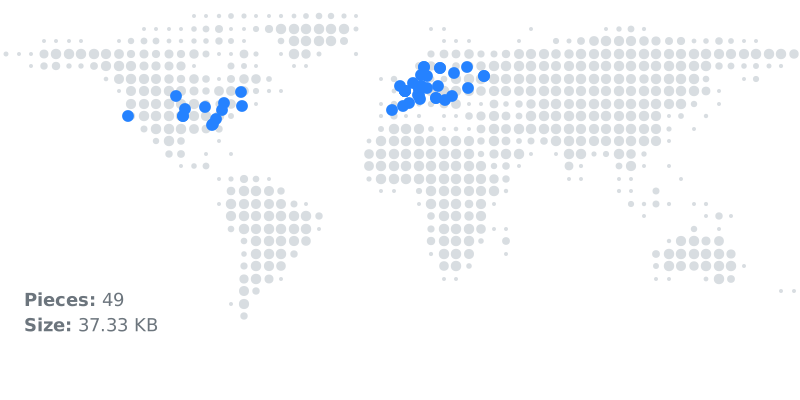
index.html file across the Storj network. Each blue dot represents a piece of the file.